Overview
Commerce Processes are used to create templates for the selling processes used by your company. With Commerce Processes, you set up your quoting, ordering, approval, and other workflow processes. By creating ordered sets of Commerce document templates, along with associated attributes and actions, you enable buyers and supplier agents to conduct transactions on your customized Oracle CPQ application. Each Commerce Process can be customized according to how you want to structure data flows for different users during the Transaction life cycle. You can create one Process for all Commerce Transactions or multiple Processes based on different purchase types.
-
Process Administration: Manage your Commerce Processes and components ( Actions, Analytics, Attributes, Data Columns, Documents, Formulas, Integrations, Library Functions, Rules, Shopping Cart, Views and Templates, and Workflow Steps. Refer to the applicable topic for more information on managing your Commerce Process:
- Refer to Redwood Process Administration for process administration using the new Redwood interface pages.
- Refer to Process Administration for process administration using the classic interface pages.
- Process Invocation: Define rules that enable the user to invoke your Commerce Process from pages in the application, such as Configuration and Parts pages. Refer to Process Invocation for more information.
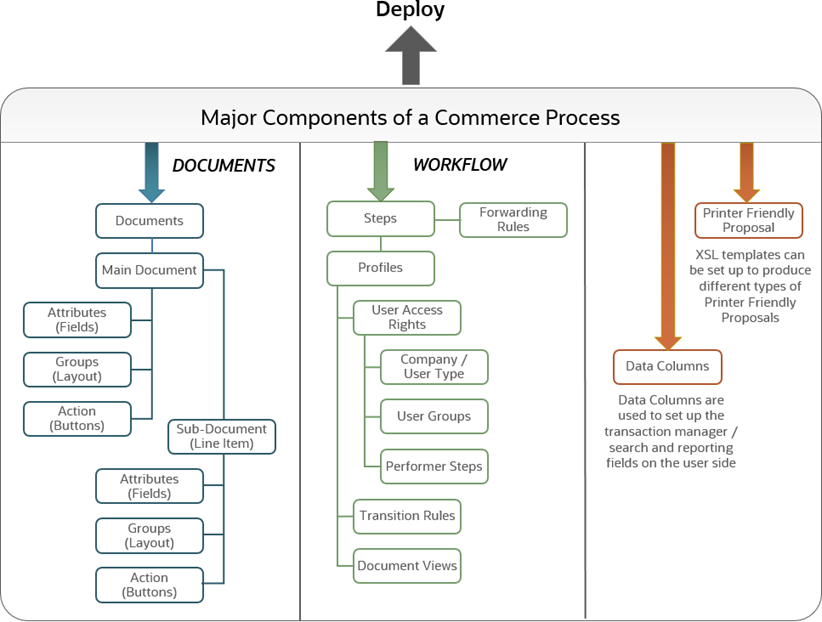
Major Components of a Commerce Process
Commerce Process tasks are administrated in an inactive, pending state. For a new Process (or a change to an existing Process) to be visible on the production side of CPQ, the Process must be deployed.
Process Types
There are two process types, Blank or Standard Process.
The Standard Process, introduced in Oracle CPQ 23B, is the default Commerce process. The Standard Process provides a standardized quote object that is automatically populated with process components and systemized functional logic.
-
Typically, the Standard Process is the only available option when creating a new Commerce Process.
-
Refer to Standard Process for more information.
Stages
Stages enable subsets of transactions within different phases of the transaction lifecycle.
- Quote - the default phase of the transaction lifecycle.
- Order - enables the ordering phase of the transaction lifecycle.
- Agreement - enables the agreement phase of the transaction lifecycle.
Transaction Editing Modes
The are three different editing mode for a transaction.
- Collaborative Editing - Multiple users can edit a Transaction at the same time.
- Transaction Locking - Single user can edit a Transaction at a time and it is locked when opened. Additional users can view the locked Transaction but cannot edit.
- Single User - Single user can edit a Transaction at a time. Additional users are not blocked from starting a new editing session which supersedes existing sessions.
 See Also


