BML Overview
Overview
BML extensible language is a scripting tool that is used to capture a company's complex business logic within Oracle CPQ Configuration and Commerce. BML is based of many different programming languages.
You will see syntax that is familiar in Java, Basic, Python, and C++, but they aren’t exactly the same. After reading the section on BML, you should have a good understanding of what programming language is and how it’s used and structured. You should also understand the syntax of BML and have generated some very basic and functional code.
 What is a function?
A function is usually defined as a rule that relates one variable value to another. In programming, it also represents a series of commands that perform an action or calculate a value depending upon certain parameters. Parameters are the values that the function uses. But, not all functions require parameters. For more information, see the topic Function Editor Basics.
What is a variable?
Variables are placeholders for the data, which a program may use or manipulate. They are given unique names so that they can be assigned values and referred to throughout the source code. In order to use a variable, you must declare it by giving it a unique name. In many programming languages, once a variable is declared, it must be initialized. However, in BML, these two steps occur simultaneously.
Variables can be used for Column names, Table names, and WHERE clauses. For more information, see the topic Dynamic BMQL Variables.
Shortcuts
Select the question mark in the toolbar above the Script Definition Area, to see the following menu of commands:
| Tab |
Add tabulation to text |
| Shift + Tab |
Remove tabulation from text |
| CTRL + F |
Search next/open search area |
| CTRL + R |
Replace/Open search area |
| CTRL + H |
Toggle syntax highlight on/off
|
| CTRL + G |
Go to line |
| CTRL + Z |
Undo |
| CTRL + Y |
Redo |
| CTRL + E |
About |
| CTRL + Q |
Close pop-up |
| Access Key E |
Toggle editor < |
Standard Syntax
You will see some standard syntax throughout the function editor:
function(param 1, param 2, param 3, [optional param])
Example:substring(str, start, [end])
| str |
String |
This is the given string for... |
| start |
Integer |
This represents the index... |
| [end] |
Integer |
This represents the index... |
Common Operators
| equals |
==
12 == 12
"string" == "string"
true == true
|
| not equal |
<>
12 <> 13
"string" <> "abc"
true <> false
|
| less than |
<
12 < 13
"13" < "14"
|
| greater than |
>
12 > 13
"13" > "14"
|
| less than or equal to |
<=
number <= number
string <= string
|
| greater than or equal to |
>=
number >= number
string >= string
|
|
and
not
or
|
<boolean> and <boolean>
<boolean> not <boolean>
<boolean> or <boolean>
|
Numeric Operators
Numeric operators always return a numeric data type. Numeric inputs include: numeric literals, numeric identifiers, and numeric functions. Numeric operators can also be used whether a numeric value can be plugged in or not, such as: in other functions, relational operators, and expressions. For more information, see the topic Numeric Functions.
| + |
Addition |
12 + 12 |
| - |
Subtraction |
15 - 12 |
| * |
Multiplication |
15 * 12 |
| / |
Division |
15 / 12 |
| % |
Modulus |
<number> % <number> |
Example:
sqrt(45 + 45)
(3 * 3) + (4 * 4)
(3 + 4) == (4 + 3)
String Operators
There is one string operator that can be used to return a string as an output. The string operator for concatenation is + and its formation is:
<string> + <string>
Literals
Literals can be added to scripts when following these conventions:
| Integer |
Numeric |
12345 |
| Floating point number |
Numeric |
123.45
12345
.345
|
| String |
String |
"volume"
"23 psi"
"100"
|
| True |
Boolean |
True |
| False |
Boolean |
False |
Administration
Programming Language
A programming language is an artificial language that is used to write instructions that a computer can understand. Programming languages can be broken down into two groups:
1. Compiled programming: this is a language that must be converted into machine language, after it’s been written by the programmer, so that a computer can understand and execute the instructions. These languages require the use of special software (called a compiler) prior to being executed.
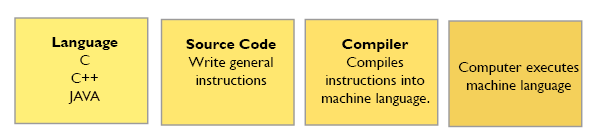
2. Interpretive programming: this language do not have to be compiled. The computer understands and executes the instructions while the program is running. See examples below.
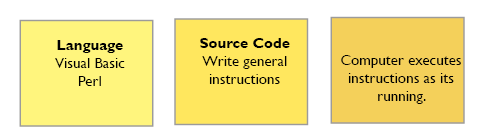
BML has characteristics of both languages. It’s a Java based mark-up language, so it does need to be compiled, but that is done within the application.
Programming Structure
BML follows the Structured computer programming model (not Object-Oriented model). Structured programming uses blocks of code that are executed one after the other. They include control statements which dictate the flow, or when these statements are executed. Almost all structured programming, including BML, shares a similar overall structure. They include:
- Statements to establish the start of the program
- Variable declarations
- Source code (blocks of programming statements)
- In BML (a return statement is always required)
Basic Data Types
Almost all programming languages include the use of data types. A data type determines the values that a variable can contain and how it is executed. A data type also represents a constraint placed on the interpretation of data. There are four basic data types:
- Integer: Data is stored as a whole number. When assigning any value that contains a decimal or a different character, it's either rounded or an error is thrown.
- Float: Data is stored and/or returned with a decimal.
- String: Allows text output of any kind to be returned. In BML, string variables will always reside within double quotations ("").
- Boolean: Returns either a True or False, based on your inputs.
Common Statement Elements
| ; |
Represents and end statement. This is required on each line of code. |
| // |
Indicates a comment line. |
| return |
This is the beginning of the return statement which is required at the end of your code. BML will not process instructions without it. |
| print |
This function displays all data types in the console to make debugging easier. You can give it direct inputs or have it print variables and results from other functions. It displays as purple in the Debugger |
You may also see the element return "";. This will return an empty String if there isn’t anything to return. It will only return a String (signified by double quotation marks), not an Integer, Float, Boolean, or Array.
Basic BML Syntax
The basic structure includes statements that comprise the source code and ends with a return statement. The example below shows variables, print statements, and a return statement.
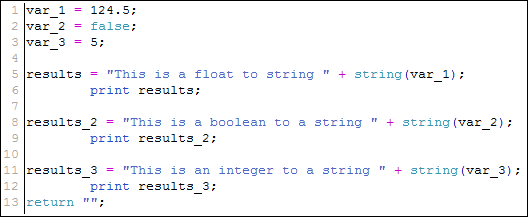
It is considered a best practice to add spaces and comments to your code. This makes the code more readable.
NOTES
The BML script compiler automatically utilizes StringBuilders during the internal processing of BML functions. This can result in a larger compiled script size. During internal processing, a BML script size limit is enforced. This may affect users attempting to update functions depending on the implementation of their site. If you want to learn more or disable the BML complier optimization enhancement, submit a Service Request (SR) on
My Oracle SupportHTML attributes are not able to be set using a BML function.
Related Topics
See Also


