Overview
The Oracle CPQ Fusion Pricing Runtime Integration offers a productized integration with Oracle Fusion Pricing, allowing users to ingest and use calculated list prices from Oracle Fusion Pricing as an opt-in feature within CPQ Pricing. Capability highlights include:
-
Enables seamless end-to-end ingestion of Fusion price lists and standard discounts into CPQ, with prices applied at runtime.
-
Provides pricing unification to reduce the dual maintenance across channels that are supported through Fusion Pricing.
-
Supports complex pricing scenarios, including multi-charge products, price waterfalls, applied or available rate plans and rate cards, BOM pricing, and coverage pricing.
-
Checks product availability on active quotes using Fusion Available-to-Promise before order creation. The Check Availability action helps sales teams review estimated availability timelines, shipping dates, arrival dates, and availability quantities while they configure and negotiate quotes, without creating inventory reservations or fulfillment commitments.
The Fusion Pricing Runtime Integration workflow is as follows:
-
Prices are authored in Oracle Fusion Pricing.
-
Pricing Engine applies prices from Oracle Fusion Pricing at runtime to quotes and orders.
-
Pre-priced orders from CPQ are submitted from CPQ to Oracle Order Management with identifiers of the Rate Plans applied.
-
Subscriptions are created in Oracle Subscription Management.
-
Oracle Fusion Pricing "rates" the actual usage to calculate invoice amounts.
Administration
 Create a Fusion Pricing Price Model
Complete the following steps to create a Fusion Pricing type Price Model.
-
Navigate to CPQ Admin > Prices > Price Models.
-
Select the Add from the Actions drop-down.
-
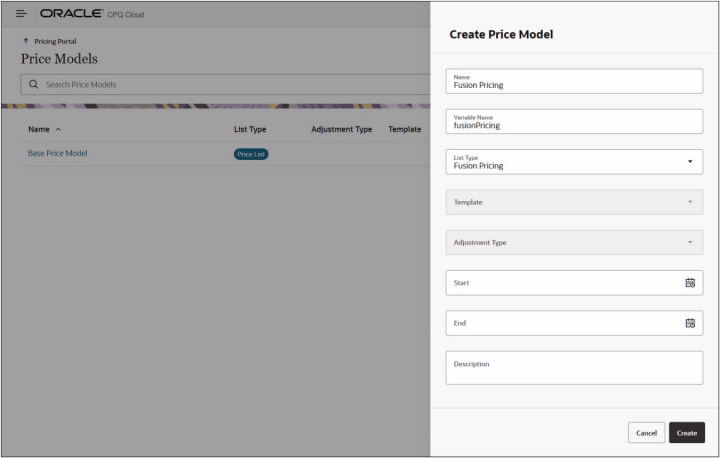
Enter the following information:
-
Enter the Name and Variable Name.
-
Select Fusion Pricing from the List Typedrop-down.
-
If applicable select a Start and End dates.
-
If applicable, enter a Description.
-
-
Click Create.
Create and Link a Pricing Rule for Fusion Pricing
Complete the following steps to create and link a Pricing Rule for the Fusion Price Model.
-
Navigate to CPQ Admin > Prices > Setup and Maintenance > Price Rules.
-
Select the Add from the Actions drop-down.
-
Enter the following information:
-
Enter the Name and Variable Name
-
If applicable select a Start and End dates.
-
If applicable, enter a Description.
-
-
Click Create.
-
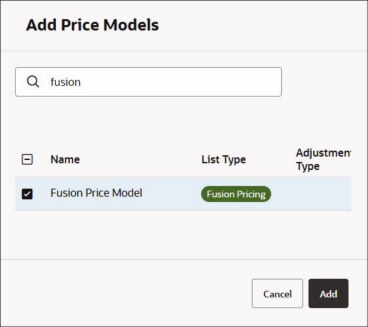
Select Add from the Linked Price Models Actions drop-down.
-
Check the applicable Fusion Pricing type Price Model.
-
Click Add.
Notes:
-
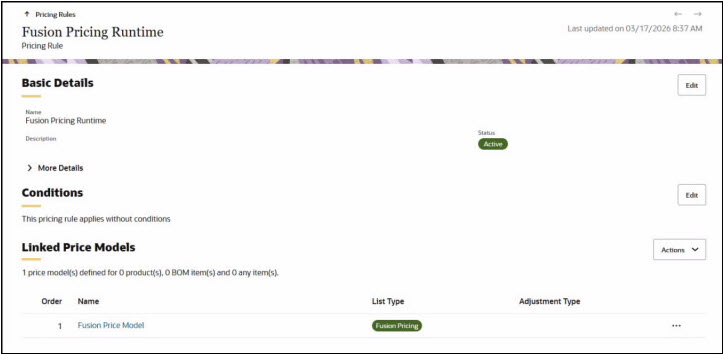
The pricing rule conditions for the Fusion Pricing Runtime integration must be Always True (i.e. The pricing rule applies without conditions).
-
For best performance, Oracle recommends that you inactivate the "Base Pricing Rule" for Oracle CPQ Fusion Pricing Runtime Integration.
Set Up an Oracle Fusion Pricing Server Integration
Complete the following steps to set up an Oracle Fusion Pricing Server integration.
-
Navigate to CPQ Admin > Integrations.
-
Click Create Integration.
-
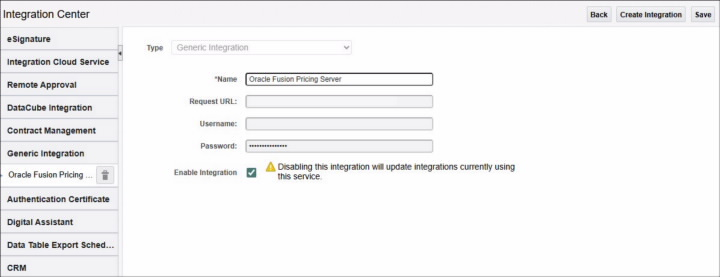
Select Generic Integration from the Type drop-down.
-
Enter the Name: Oracle Fusion Pricing Server
-
Enter the Request URL for the Oracle Fusion Pricing application.
-
Enter the Username and Password login credentials for the integration user.
-
Select the Enable Integration option.
-
Click Save.
Synchronize Fusion Pricing Reference Data
Fusion Pricing reference data includes charge definitions, price types, charge types, usage UOMs, price periods and service duration periods. When Fusion Pricing reference data is updated, complete the following steps to synchronize the reference data from Fusion Pricing.
-
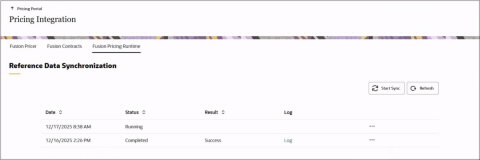
Navigate to CPQ Admin > Prices > Pricing Integration.
-
Select the Fusion Pricing Runtime tab.
-
Click Start Sync.
Map CPQ Pricing Attributes to Fusion Pricing Attributes
Complete the following steps to map a CPQ pricing attribute to an Oracle Fusion Pricing attribute.
-
Navigate to CPQ Admin > Prices > Pricing Attributes.
-
Select the applicable pricing attribute.
-
Select Edit from the Actions drop-down.
-
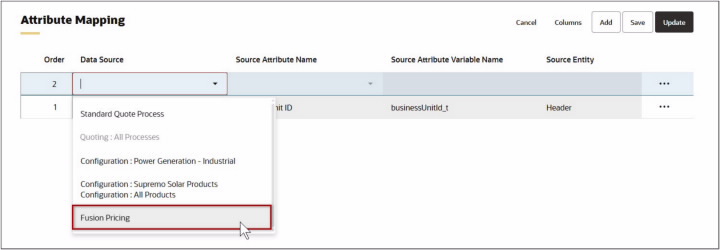
Click Add.
-
Select Fusion Pricing from the Data Source drop-down.
-
Select the appropriate attribute from the Source Attribute Name drop-down.
-
To reorder mapping attributes, click in the Order field and enter the desired order number.
-
To delete an attribute mapping, click the ellipsis at the end of the line and select Delete.
-
-
Click Save or Update.
Negotiate Fusion Pricing Rate Plans and Entitlements in Quotes
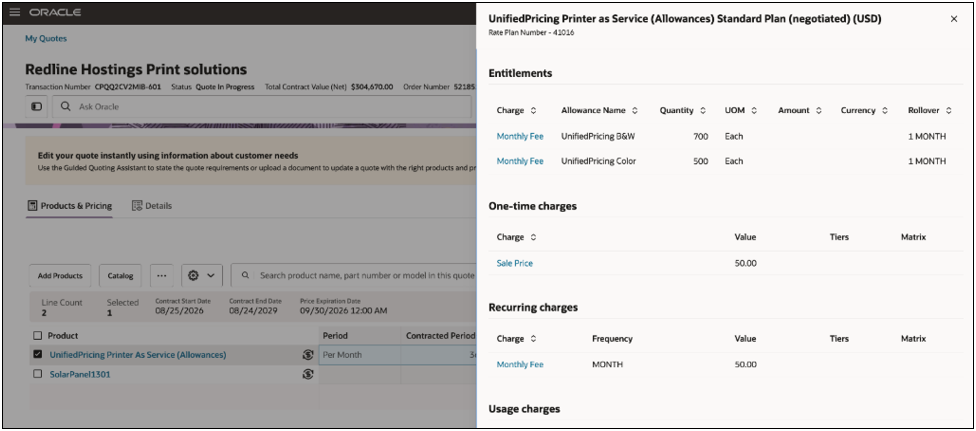
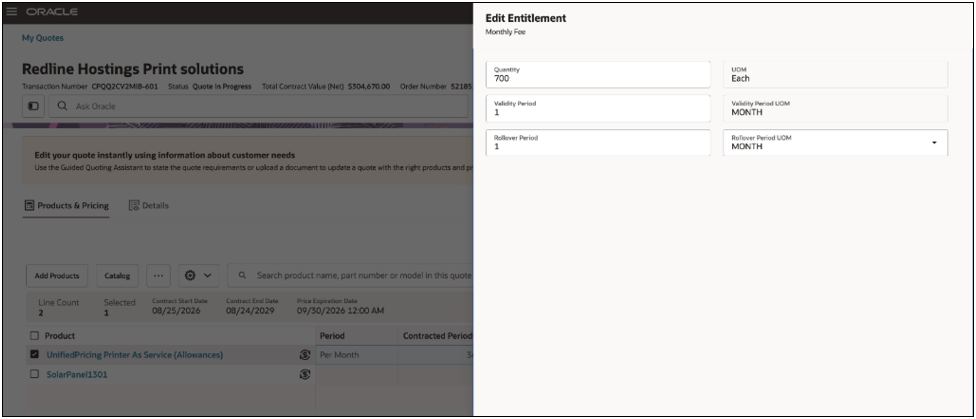
Oracle CPQ lets sales users view and negotiate the complete commercial terms of Fusion Pricing rate plans directly in a quote—including charges, rate cards, tiered, volume, and block pricing, as well as subscription entitlements.
Sellers can clearly explain both what the customer will pay and what the customer is entitled to use. Entitlement details can include allowance, estimate, and commitment models, with quantities, units, billing and reset periods, and applicable true-up or overage terms.
Where configured and permitted, users can negotiate charge discounts or net prices, rate card and tier values, and entitlement values. Non-negotiable fields remain visible and read-only. All negotiated values are saved with the quote, without changing the source rate plan in Fusion Pricing, and flow to downstream order, subscription, and supported self-service processes.
Refer to Unified Rate Plans for Rates and Entitlements for more information.
This feature provides the following benefits:
-
Give sellers a complete view of subscription pricing and customer entitlements in one quote experience.
-
Support controlled negotiation of complex commercial terms, including usage, tiers, discounts, and commitments.
-
Improve customer clarity and reduce disputes around included usage, overages, and true-up terms.
-
Preserve approved quote-specific pricing and entitlement context through downstream fulfillment and subscription processes.
Access Requirements:
-
Users must have access to Oracle CPQ quotes and subscription quote lines.
-
Users must have access to the rate plan details experience for applicable quote lines.
-
Users who negotiate entitlement values require permission to edit the configured negotiable fields.
-
Fusion Pricing rate plans and entitlement definitions must be available for the Subscription products in the quote.
To enable the feature, complete the following steps:
-
Create or identify subscription products with rate plans in Fusion Pricing.
-
Configure the associated charges, rate cards, and tiered, volume, or block pricing structures.
-
Configure applicable entitlement details, including allowance, estimate, or commitment terms.
-
Define which charge values, pricing structures, and entitlement fields are negotiable.
-
Configure whether users can apply flat discounts, row-level discounts, price overrides, or view values as read-only.
-
Enable the Oracle CPQ and Fusion Pricing integration for the supported quoting flow.
-
Configure the quote-line experience to expose rate plan details, the Entitlement section, and the action to modify permitted values.
-
Assign users access to the applicable quote actions and editable negotiation fields.
-
Optionally, configure proposal or document generation to retrieve rate plan, pricing, and entitlement details, including the Rate Plan HTML line attribute where required.
-
Validate quote save, reopen, copy, revise, approval, proposal generation, and downstream order and subscription flows.
To use this feature in a quote, complete the following steps:
-
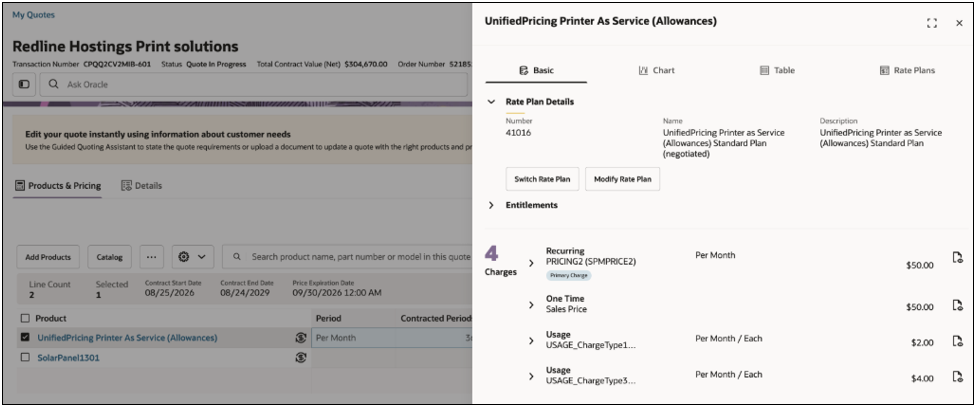
Add a subscription product with a Fusion Pricing rate plan to a quote.
-
Open the rate plan details or charge drawer for the quote line.
-
Review pricing, rate card, tier, and entitlement details.
-
Update permitted charge, pricing-structure, or entitlement values.
-
Reprice and save the quote to retain the negotiated terms for downstream processing.
Notes:
-
This feature is only available for Oracle CPQ running in Fusion customers that create rate plan entitlements in Fusion Pricing.
-
Negotiated values apply only to the quote instance and don’t modify the source rate plan in Fusion Pricing.
-
Pricing setup and access controls determine whether a rate card or pricing structure supports flat discount, row-level negotiation, or no negotiation.
-
The Fusion Pricing supported entitlement models include allowance, estimate, and commitment.
-
Non-negotiable fields remain visible but read-only.
Show Product Availability on Quotes with Fusion Pricing
Sales users can check product availability on active quotes using Fusion Available-to-Promise before order creation. The Check Availability action helps sales teams review estimated availability timelines, shipping dates, arrival dates, and availability quantities while they configure and negotiate quotes, without creating inventory reservations or fulfillment commitments.
Feature Highlights:
-
Check availability on demand for selected quote lines or all eligible quote lines in an active quote.
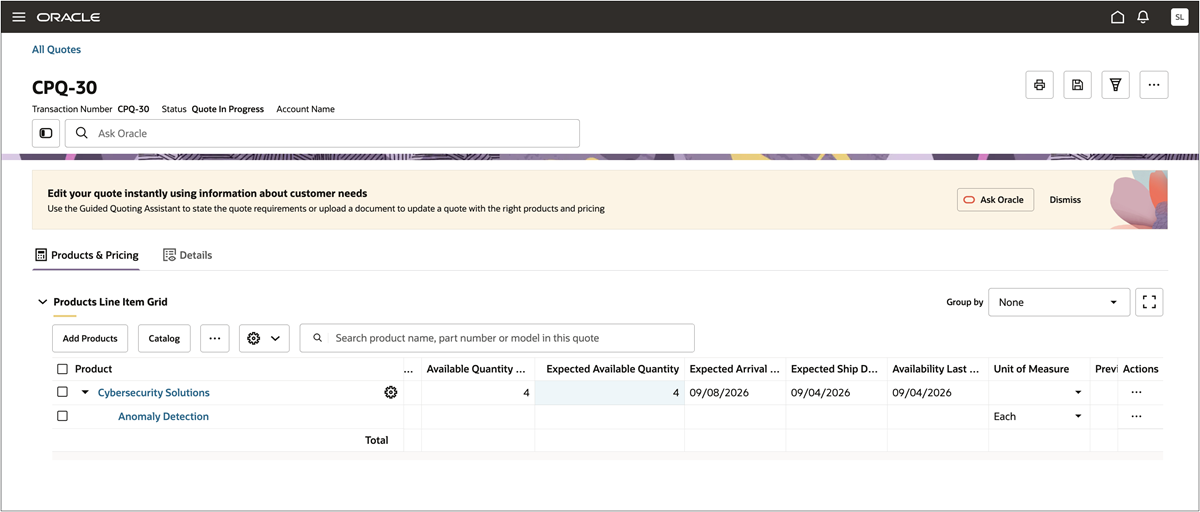
-
View quote line availability details such as expected ship date, expected arrival date, available quantity on the requested date, expected available quantity, and latest availability checked date.
-
Continue quoting while the availability request runs asynchronously.
-
Process eligible Fusion Global Order Promising (GOP) requests in batches of 200 quote lines.
-
Preserve availability results on quote lines so the values can be used in proposals or documents where configured after the quote is saved.
Sales teams can set more accurate fulfillment expectations while configuring, quoting, and negotiating deals. Availability visibility helps reduce quote-to-order uncertainty for high-value or large-volume quotes without creating inventory reservations or fulfillment commitments.
Prerequisites:
-
Oracle CPQ site is running in Fusion. Refer to Oracle Fusion and Oracle CPQ Initial Setup.
-
Oracle CPQ is running in Redwood layout.
-
Complete the required Fusion Order Management, Product Information Management, Global Order Promising, and Planning Data Repository setup.
To enable this feature, complete the following steps:
-
Configure the Standard Process so the Check Availability main document action is available for quote lines.
-
Make the standard quote line availability attributes available in the buy-side line item grid:
-
Availability Last Checked Date
-
Expected Arrival Date
-
Expected Ship Date
-
Available Quantity on Requested Date
-
Expected Available Quantity
-
-
Enable the required item attributes in the Part Attribute Set, including item type and item subtype.
-
Add the Check Availability action to the buyside Redwood layout.
-
Deploy the commerce process.
-
(Optional) Configure proposals or documents to use the standard quote line availability fields after quote save.
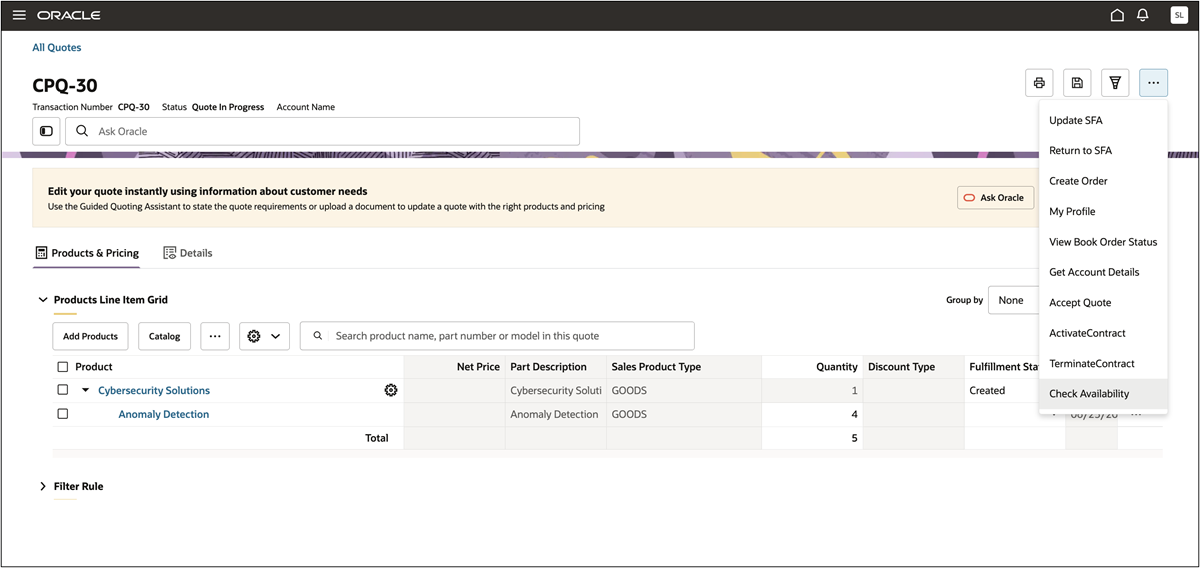
To show product availability on a quote, complete the following:
-
Open an active quote.
-
Select the quote lines that need availability details. If no lines are selected, Check Availability runs for all eligible quote lines in the quote.
-
Run the Check Availability action.
-
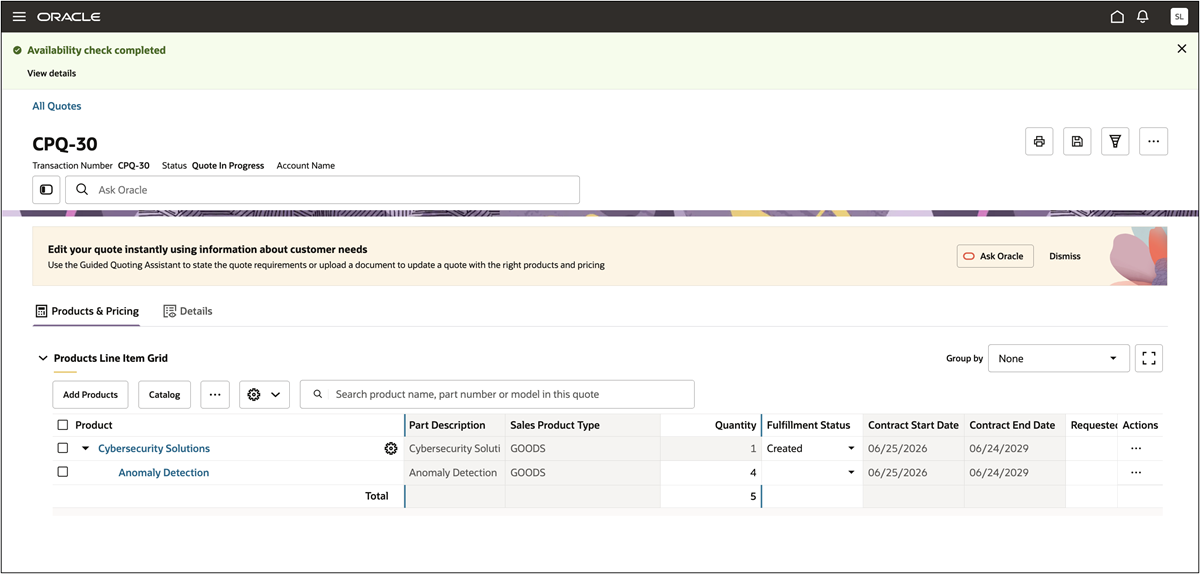
Continue working in the quote while CPQ processes the asynchronous availability request.
-
Review the updated quote line availability details after processing completes.
Notes:
-
Availability data is for quoting simulation only. It doesn’t create inventory reservations, soft booking, request holds, or guaranteed fulfillment.
-
Availability data can become stale after invocation.
-
Users can continue other quote operations while Check Availability is running.
-
If Fusion Global Order Promising (GOP) can’t return a result because of missing data, timeout, unsupported items, or service issues, Oracle CPQ displays a descriptive message and doesn’t block quoting.
-
Proposal and document usage of the availability fields is available only after the quote is saved.
-
When a quote is created, the following two attributes must be populated: Ship To Party ID (
_s_shipToPartyID_t) and Ship To Party Site ID (_s_shipToPartySiteID_t).These two attributes are populated during TCA Account integration. -
Check Availability is relevant only for GOODS type of items. It is not relevant for subscriptions, coverages, etc.
Enable Service Contract Coverage Pricing
Oracle CPQ 26C and later supports an Enable Contract Coverage pricing attribute to designate if an item is eligible to be covered under a service contract and apply the appropriate coverage pricing. When enabled the Enable Contract Coverage attribute synchronizes via Oracle Sales Product Information Management (SPIM) and is exposed in Part services, and honored by Oracle CPQ quoting and pricing coverage workflows.
Organizations can align Oracle CPQ coverage eligibility with SPIM-managed product data, reduce manual handling of non-coverable items, and improve consistency of coverage behavior across product sync, quoting, and pricing execution.
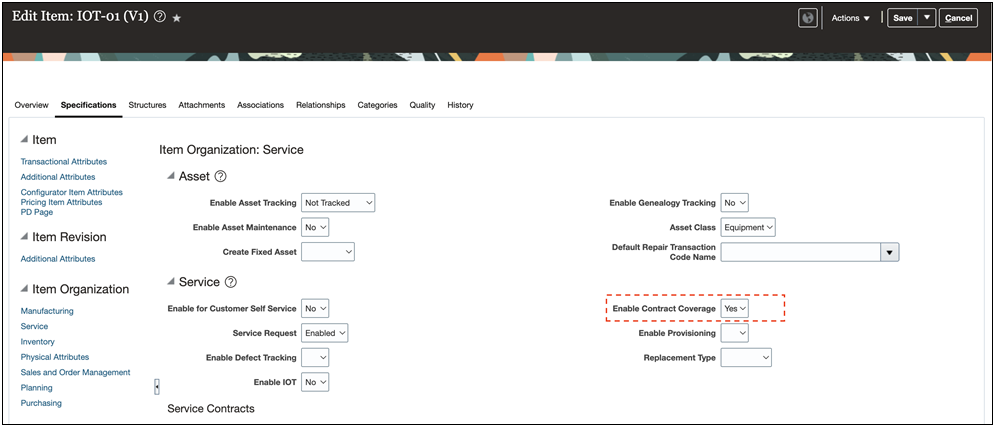
Prerequisites:
-
CPQ administrators and implementation users with access to product sync configuration, Part schema/API management, and commerce process attribute configuration are required to enable and validate this functionality.
-
The feature requires schema and integration uptake and Commerce Process attribute enablement before quote behavior uses the new coverage eligibility flag.
-
Ensure product synchronization from Product Information Management (PIM) includes Enable Contract Coverage and related item-type schema values for parts and ‘Enable Contract Coverage Flag’ is enabled.
Complete the following steps to include the Enable Contract Coverage flag in your Standard Commerce process:
-
Navigate to CPQ Admin > Quotes.
-
Select the applicable Standard Commerce Process.
-
Navigate to the Manage Transaction Line > Attributes section.
-
Enter Type: Part Attribute Set in the Attributes search.
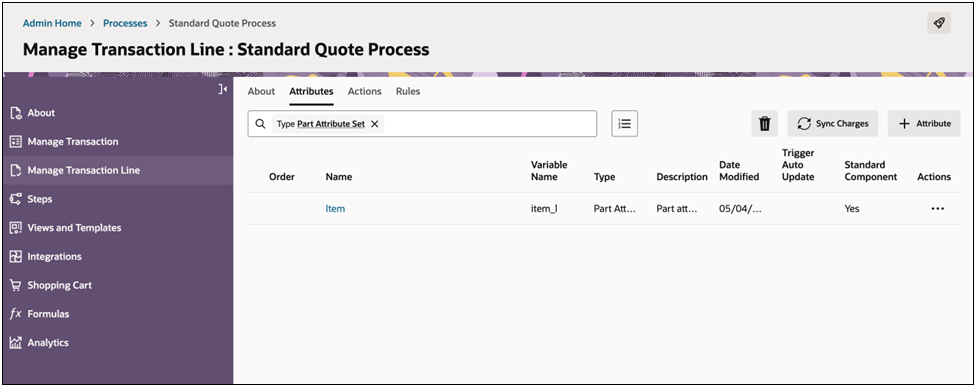
-
Click on the Part Attribute Set link to edit the part attribute set details.
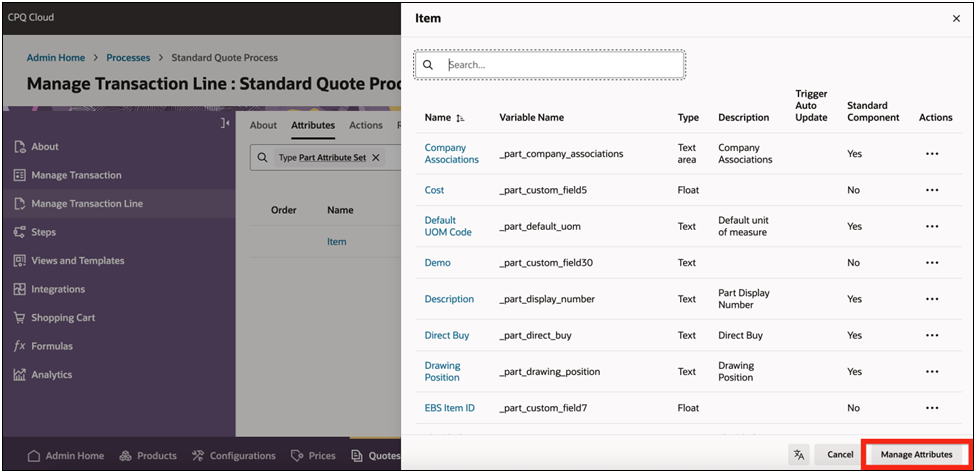
-
Click Manage Attributes.
-
Select Enable Contract Coverage.
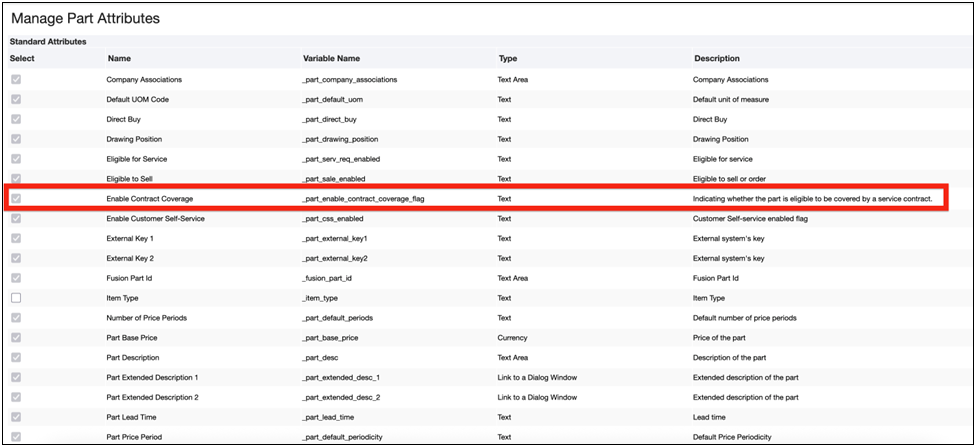
-
Deploy the Commerce process.
Notes
Notes:
-
The pricing rule conditions for the Fusion Pricing Runtime integration must be Always True (i.e. The pricing rule applies without conditions).
-
For best performance, Oracle recommends that you inactivate the "Base Pricing Rule" for Oracle CPQ Fusion Pricing Runtime Integration.


