Overview
The Oracle CPQ Fusion Pricing Administration Integration ensures pricing data is synchronized between Oracle CPQ and Oracle Fusion Pricing.
The CPQ Pricing Engine writes the identifiers of the synchronized objects at runtime into quote charges, which can then be integrated downstream to Oracle Fusion Pricing via Oracle Fusion Order Management. For additional information, refer to Rate Plan Support for Oracle Order Management - CPQ Integrations. When integrated with CPQ, Oracle Fusion Order Management applies the net prices negotiated in CPQ as pre-priced sales order lines. Oracle Order Management uses the Rate Plans, Rate Cards and usage prices integrated from CPQ to perform the rating of actual usage and the calculation of invoice amounts.
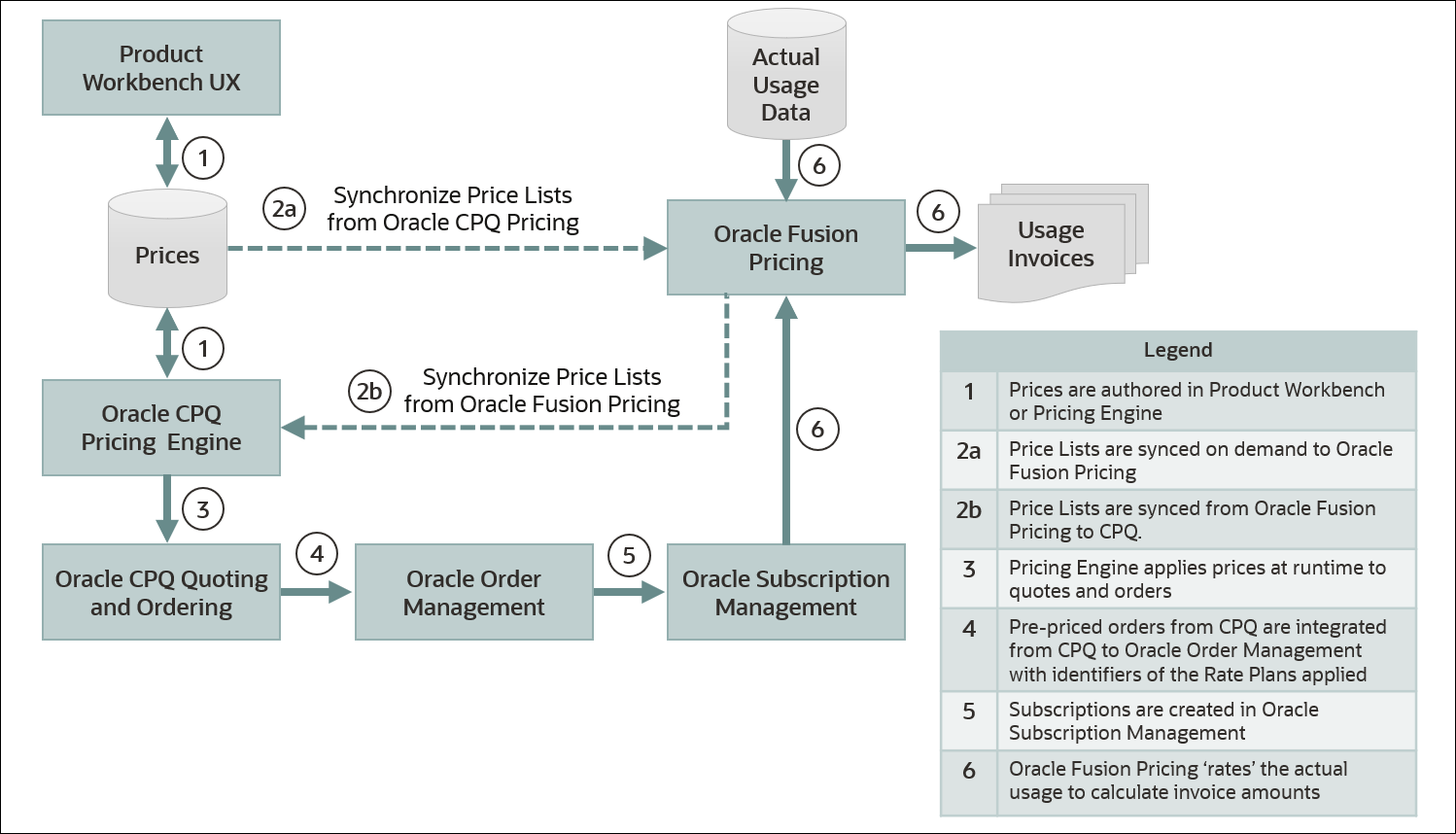
Price lists can be synchronized from Oracle CPQ to Oracle Fusion Pricing or from Oracle Fusion Pricing to Oracle CPQ.
 Synchronize Price Lists from Oracle CPQ to Fusion Pricing (2a)
The following objects in CPQ will be synchronized with Oracle Fusion Pricing:
-
CPQ Price Model > Oracle Fusion Pricing Price List
-
CPQ Price Model Items (Products) > Oracle Fusion Pricing Price List Item
-
CPQ Price Model Item (Product) Charges > Oracle Fusion Pricing Price List Item Charges
-
CPQ Price Model Item (Product) Rate Plan > Oracle Fusion Pricing Price List Item Rate Plan
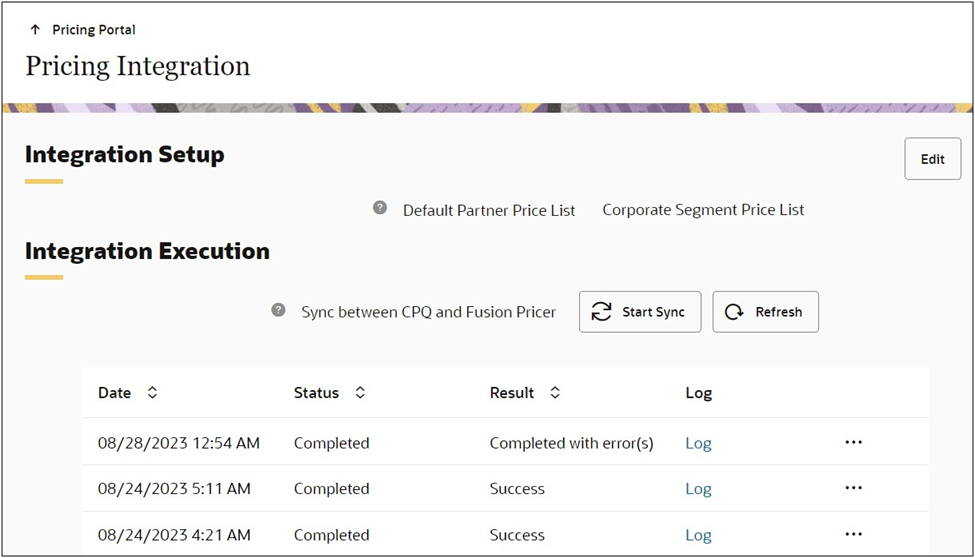
The Pricing Portal Pricing Integration module allows CPQ pricing administrators to define the Default Partner Price List and initiate synchronization of price lists between CPQ and Oracle Fusion Pricing. The initial synchronization will synchronize all relevant pricing information. Thereafter only delta changes are sent. Pricing administrators can click on the desired Log link to view details for the synchronization task including deleted pricing definitions, updated Price Model Items, and new Price Model Items.
Synchronization Price Lists from Oracle Fusion Pricing to CPQ (2b)
Beginning in Oracle CPQ 24D, Oracle provides customers a mechanism to automatically synchronize base price lists from Oracle Fusion Pricing into CPQ Pricing Engine. The Oracle Fusion Pricing to Oracle CPQ Synchronization ensures that CPQ has the most up-to-date pricing information from Oracle Fusion Pricing, minimizes the risk of pricing discrepancies, and eliminates manual data entry and redundant data uploads. This feature enables the transfer of pricing elements like price models, price model items, charges, and rate plans directly from Fusion Pricing to CPQ. The synchronization process leverages CPQ Bulk Data Services APIs, ensuring efficient and reliable data transfer.
Streamlined Price List Synchronization from Fusion Pricing to CPQ
Oracle CPQ 25A introduces significant enhancements to the integration of Fusion Pricing to CPQ Pricing Engine, streamlining price list synchronization and improving user experience. Here's what's new:
-
Simplified Access: Easily access the Integration landing page directly from Fusion Setup and Maintenance.
-
Advanced Scheduling: Create multiple schedules for different price lists, enabling granular control over synchronization.
-
Intuitive User Interface: Enjoy a new, simplified user experience for scheduling price list syncs.
-
Advanced Filtering: Utilize advanced mode to define complex criteria for selecting price lists to synchronize.
-
Efficient Monitoring: Quickly access integration run history for specific schedules.
These enhancements empower businesses to:
• Increase efficiency: Reduce time spent managing price list synchronization through simplified access and advanced scheduling.
• Gain greater control: Tailor synchronization schedules to meet specific business needs.
You can now synchronize prices from Fusion Price Lists to CPQ. Support for this integration is provided by an Oracle Fusion Pricing pages for scheduling integration executions and monitoring the progress and completion of integration instances. In addition, seeded mappings of attributes between the two applications are provided for turn-key integration support.
The following objects in Fusion Pricing will be synchronized with CPQ:
-
Oracle Fusion Pricing Price List > CPQ Price Model
-
Oracle Fusion Pricing Price List Item > CPQ Price Model Items (Products)
-
Oracle Fusion Pricing Price List Item Charges > CPQ Price Model Item (Product) Charges
-
Oracle Fusion Pricing Price List Item Rate Plan > CPQ Price Model Item (Product) Rate Plan
Import Fusion Charge Definitions and Lookups into CPQ
Beginning in Oracle CPQ 25C, Oracle CPQ automates the integration of charge definitions and lookups to CPQ for the specified Fusion Price List being imported. Automatically importing and mapping Charge Definitions and Lookups from Fusion to CPQ Pricing Engine objects reduces the manual setup needed to implement unified pricing and the potential for inconsistencies and errors. The following lookup data is synchronized:
-
Fusion Pricing Lookup Code is mapped to the CPQ Price Type Integration Id
-
Fusion Charge Type and Charge Sub Type data is concatenated and mapped to CPQ Charge Types.
-
Fusion Price Periodicity data is mapped to CPQ Price Periods
-
Fusion Usage UOM data is mapped to CPQ Usage Units of Measure
-
Fusion Charge Period UOM data is mapped to CPQ Price Periods
Notes:
-
When Oracle Fusion Pricing to Oracle CPQ Synchronization is implemented, the Fusion Pricer tab is not displayed in the CPQ Pricing Integration. Synchronization tasks are scheduled and maintained in Oracle Fusion Pricing.
-
Charges for component items are not synchronized in Oracle 24D
-
However, component item charges are synchronized to CPQ in Oracle 25A
-
Dynamic pricing is not supported (Matrix pricing > Rate Card)
-
To remove a price from synchronization, you should update the end date in Fusion instead of deleting it from the price list.
Administration
Synchronize Prices from Oracle CPQ to Oracle Fusion Pricing
Complete the following tasks to set up an Oracle CPQ to Oracle Fusion Pricing Integration:
Establish Common Lookup Codes and Charge Definitions
You need to make sure that common lookups and charge definitions are created in Oracle CPQ and Oracle Fusion Pricing.
Note: For details on Fusion Pricing Lookups, refer to: Oracle Help Center / Administering Pricing / Manage Pricing Lookups
Complete the following steps:
-
Set up common Price Type Pricing Lookups:
-
In the Fusion Application:
-
Navigate to the FSM task: Manage Pricing Lookups.
-
Search for the lookup code: ORA_QP_PRICE_TYPES.
-
Copy the lookup codes for all the price types. For example,
-
One Time lookup code. (e.g. ONE_TIME)
-
Recurring lookup code. (e.g. RECURRING)
-
Usage lookup code. (e.g. ORA_USAGE)
-
-
-
Navigate to CPQ > Admin > Pricing Portal > Pricing Lookups > Price Types.
-
For the Fusion price types you identified, edit or add the corresponding Lookup Values.
-
Update the lookup value Integration ID with the corresponding lookup code from Fusion.
For example:
-
One Time Integration ID: ONE_TIME
-
Recurring Integration ID: RECURRING
-
Usage Integration ID: ORA_USAGE
-
-
-
Set up common Charge Type Pricing Lookups:
Note: Fusion Pricing has charge type and charge sub type lookups, but CPQ only has charge types. The combination of price type and charge type must be unique when creating a charge definition in CPQ. Hence when creating charges and rate plans in Fusion price lists that you want to sync to CPQ, you have to make sure that you only use one sub type for a charge type.
-
In the Fusion Application:
-
Identify all the charge types that you are using in the price lists you want to sync with CPQ.
-
Navigate to the FSM task: Manage Pricing Lookups.
-
Search for the lookup code: ORA_QP_CHARGE_TYPES
-
Copy the lookup codes for the charge types that you identified above.
For example, Sales Price - Charge Sub Type lookup code (e.g. ORA_QP_CHARGE_TYPES_ORA_SALE)
-
-
Navigate to CPQ > Admin > Pricing Portal > Pricing Lookups > Charge Types
-
For the Fusion charge types you identified, edit or add the corresponding Lookup Values.
-
Update the lookup value Integration ID with the corresponding lookup code from Fusion.
For example, Sales Price Integration ID: ORA_QP_CHARGE_TYPES_ORA_SALE
-
-
Set up common Price Period Pricing Lookups:
-
In the Fusion Application:
-
Identify all the Price Periodicities in the price lists you want to sync. You can find them by going through the charges for your price list items.
-
Navigate to the FSM task: Manage Units of Measure.
-
Look for the price periodicity you want to sync and copy the UOM Code.
-
-
Navigate to CPQ > Admin > Pricing Portal > Pricing Lookups > Price Periods.
-
For the Fusion price periods you identified, edit or add the corresponding Lookup Values.
-
Update the lookup value Integration ID with the corresponding lookup code from Fusion.
-
-
Set up common Usage Units of Measure Pricing Lookups:
-
In the Fusion Application:
-
Identify all the usage uoms in the price list item rate plans. You can find them by going through the rate plans for your price list items.
-
Navigate to the FSM task: Manage Units of Measure.
-
Look for the usage uom you want to sync and copy the UOM Code.
-
-
Navigate to CPQ > Admin > Pricing Portal > Pricing Lookups > Price Periods.
-
For the Fusion usage UOMs you identified, edit or add the corresponding Lookup Values.
-
Update the lookup value Integration ID with the corresponding lookup code from Fusion.
-
-
Set up common Charge Definitions:
-
In the Fusion Application:
-
Identify all the charge definitions used in your Fusion pricing. You can find them by going through your charges and rate plans.
-
Navigate to the FSM task Manage Pricing Charge Definitions.
-
Search for the charge definitions used in your pricing. For each definition, note the charge definition code, price type and charge type.
-
-
Navigate to CPQ > Admin > Pricing Portal > Charge Definitions.
-
For the Fusion Charge Definitions you identified, edit or add the corresponding Charge Definitions.
-
Update the Integration ID with the corresponding charge definition code from Fusion.
-
Set Up a Fusion Pricing Integration in CPQ
Complete the following steps to set up a CPQ-Oracle Fusion Pricing integration.
- Navigate to CPQ Admin > Integration Center.
- Click Create Integration.
-
Select Generic Integration from the Type drop-down.
-
Enter the following information:
- Enter "Fusion Pricing Integration" for the Name.
- Enter the Request URL for the Oracle Fusion Pricing application.
- Enter the Username and Password login credentials.
- Select the Enable Integration option.
- Click Save.
Initiate an Oracle CPQ to Oracle Fusion Pricing Synchronization
Complete the following steps to define the default partner price list.
-
Navigate to CPQ Admin > Prices > Pricing Integration.
-
Select the Fusion Pricer tab.
-
Click Edit.
-
Select the applicable price list from the Default Partner Price List drop-down.
-
Click Update.
-
Click Start Sync.
Synchronize Prices from Oracle Fusion Pricing to Oracle CPQ
Complete the following tasks prior to setting up Oracle Fusion - Oracle CPQ Price List Integration.
Establish Common Lookup Codes and Charge Definitions Oracle CPQ 25B and Prior
You need to make sure that common lookups and charge definitions are created in Oracle CPQ and Oracle Fusion Pricing.
Notes:
-
You do NOT need to perform this procedure for Oracle CPQ 25C and later. The integration of charge definitions and lookups for imported Fusion Price Lists are now automated.
-
For details on Fusion Pricing Lookups, refer to: Oracle Help Center / Administering Pricing / Manage Pricing Lookups
Complete the following steps:
-
Set up common Price Type Pricing Lookups:
-
In the Fusion Application:
-
Navigate to the FSM task: Manage Pricing Lookups.
-
Search for the lookup code: ORA_QP_PRICE_TYPES.
-
Copy the lookup codes for all the price types. For example,
-
One Time lookup code. (e.g. ONE_TIME)
-
Recurring lookup code. (e.g. RECURRING)
-
Usage lookup code. (e.g. ORA_USAGE)
-
-
-
Navigate to CPQ > Admin > Pricing Portal > Pricing Lookups > Price Types.
-
For the Fusion price types you identified, edit or add the corresponding Lookup Values.
-
Update the lookup value Integration ID with the corresponding lookup code from Fusion.
For example:
-
One Time Integration ID: ONE_TIME
-
Recurring Integration ID: RECURRING
-
Usage Integration ID: ORA_USAGE
-
-
-
Set up common Charge Type Pricing Lookups:
Note: Fusion Pricing has charge type and charge sub type lookups, but CPQ only has charge types. The combination of price type and charge type must be unique when creating a charge definition in CPQ. Hence when creating charges and rate plans in Fusion price lists that you want to sync to CPQ, you have to make sure that you only use one sub type for a charge type.
-
In the Fusion Application:
-
Identify all the charge types that you are using in the price lists you want to sync with CPQ.
-
Navigate to the FSM task: Manage Pricing Lookups.
-
Search for the lookup code: ORA_QP_CHARGE_TYPES
-
Copy the lookup codes for the charge types that you identified above.
For example, Sales Price - Charge Sub Type lookup code (e.g. ORA_QP_CHARGE_TYPES_ORA_SALE)
-
-
Navigate to CPQ > Admin > Pricing Portal > Pricing Lookups > Charge Types
-
For the Fusion charge types you identified, edit or add the corresponding Lookup Values.
-
Update the lookup value Integration ID with the corresponding lookup code from Fusion.
For example, Sales Price Integration ID: ORA_QP_CHARGE_TYPES_ORA_SALE
-
-
Set up common Price Period Pricing Lookups:
-
In the Fusion Application:
-
Identify all the Price Periodicities in the price lists you want to sync. You can find them by going through the charges for your price list items.
-
Navigate to the FSM task: Manage Units of Measure.
-
Look for the price periodicity you want to sync and copy the UOM Code.
-
-
Navigate to CPQ > Admin > Pricing Portal > Pricing Lookups > Price Periods.
-
For the Fusion price periods you identified, edit or add the corresponding Lookup Values.
-
Update the lookup value Integration ID with the corresponding lookup code from Fusion.
-
-
Set up common Usage Units of Measure Pricing Lookups:
-
In the Fusion Application:
-
Identify all the usage uoms in the price list item rate plans. You can find them by going through the rate plans for your price list items.
-
Navigate to the FSM task: Manage Units of Measure.
-
Look for the usage uom you want to sync and copy the UOM Code.
-
-
Navigate to CPQ > Admin > Pricing Portal > Pricing Lookups > Price Periods.
-
For the Fusion usage UOMs you identified, edit or add the corresponding Lookup Values.
-
Update the lookup value Integration ID with the corresponding lookup code from Fusion.
-
-
Set up common Charge Definitions:
-
In the Fusion Application:
-
Identify all the charge definitions used in your Fusion pricing. You can find them by going through your charges and rate plans.
-
Navigate to the FSM task Manage Pricing Charge Definitions.
-
Search for the charge definitions used in your pricing. For each definition, note the charge definition code, price type and charge type.
-
-
Navigate to CPQ > Admin > Pricing Portal > Charge Definitions.
-
For the Fusion Charge Definitions you identified, edit or add the corresponding Charge Definitions.
-
Update the Integration ID with the corresponding charge definition code from Fusion.
-
Setup Oracle Fusion - Oracle CPQ Price List Integration
Refer to How do I get started with the Revenue Transformation Solution? Oracle Sales Playbook for more information focused on the following Oracle Fusion Pricing to Oracle CPQ integration implementation tasks:
-
Enable Data Integration between Oracle Pricing and Oracle CPQ Pricing
-
Setup the Connection from Oracle Pricing to Oracle CPQ
-
Schedule the Oracle Pricing to Oracle CPQ Pricing Sync
-
View or Cancel an Integration Sync
Notes
Notes:
-
As the integration is based on CPQ Pricing Engine, you should use pricing behavior Version 2 or higher. For more information about pricing behaviors, refer to Pricing Options.
- To apply Volume-type tier pricing to a usage charge in Oracle CPQ 23D, create a Rate Card with the from / to tier dimensions as columns.
-
Oracle Fusion Pricing Integration supports tier and volume pricing with rating usage.


