Overview
Fusion Pricing Support for Sales Agreements Overview
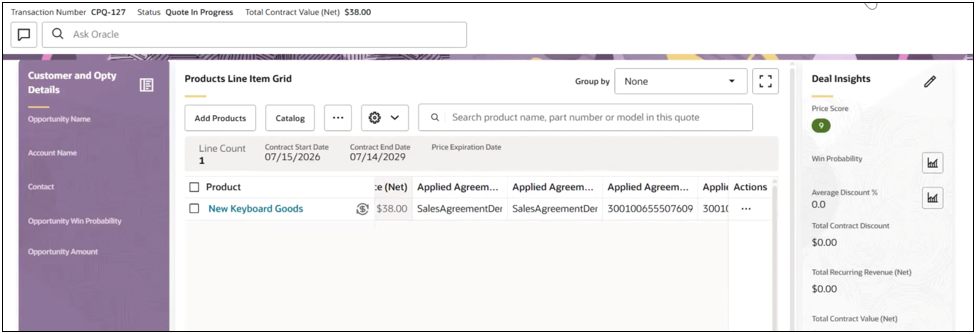
Oracle CPQ running in Fusion can honor customer-specific Sales Agreement pricing from Fusion Pricing when CPQ uses Fusion Pricing as the pricing engine. When a quote line has a selected or defaulted Sales Agreement line, CPQ passes the agreement context to Fusion Pricing so the returned price reflects the applicable customer agreement.
Sales users can select a Sales Agreement at the quote header and use it to default agreement information to quote lines. When multiple valid agreements exist for the same account and product, users with the right access can select a different Sales Agreement line at the quote line level.
The Sales Agreement picker uses eligible agreement information filtered by account, product, status, effective dates, business unit, currency, item, inventory organization, and unit of measure. CPQ maps the selected or defaulted agreement values into the Fusion Pricing request, including the agreement integration ID, agreement version, and agreement line ID.
When agreement pricing makes a charge non-negotiable, discount type and discount value are read-only for that charge. Negotiable charges continue to allow manual discount entry according to existing runtime behavior.
This feature helps organizations keep quoted prices aligned with customer-specific Sales Agreements mastered in Fusion Pricing. It reduces manual pricing overrides, supports downstream pricing consistency, and helps prevent renegotiation of prices that are already governed by active customer agreements.
Fusion Sales Agreements and Pricing Integration for Oracle CPQ Running in Fusion
The following describes the integration setup steps for setting up Oracle Fusion sales agreements contract and pricing for Oracle CPQ running in Fusion.
Sales users can negotiate sales agreement prices in Oracle CPQ and create the corresponding Fusion Sales Agreement Contract. This helps organizations use CPQ for agreement negotiation while making Fusion Sales Contracts and Fusion Pricing the downstream source for contract and pricing execution.
Feature Highlights:
-
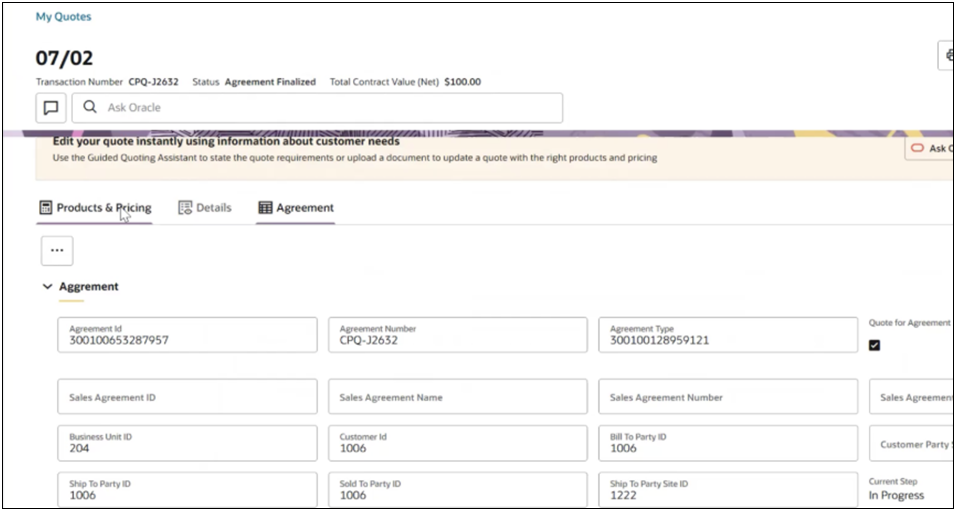
Allows reps to instantly transform a standard quote into an agreement flow using a simple "Quote for Agreement" toggle right within their familiar CPQ workspace.
-
Enables reps to fetch customer details, define contract terms, and negotiate special net prices or volume commitments completely within CPQ without hopping between separate systems.
-
Natively maps header-level facts, net prices, and committed product quantities directly to Fusion Pricing (QP), making it the central master execution table.
Integrate Sales Agreements Pricing to Sales Contracts to:
-
Ensure the exact net prices and discounts negotiated by the rep automatically master across all downstream operations, including future Order Management captures, EDI transactions, and change orders.
-
Establish upfront committed quantities and negotiated net prices directly within Fusion execution layers, eliminating pricing discrepancies and manual pricing overrides on repeat orders.
The following shows a CPQ agreement quote with Quote for Agreement selected.
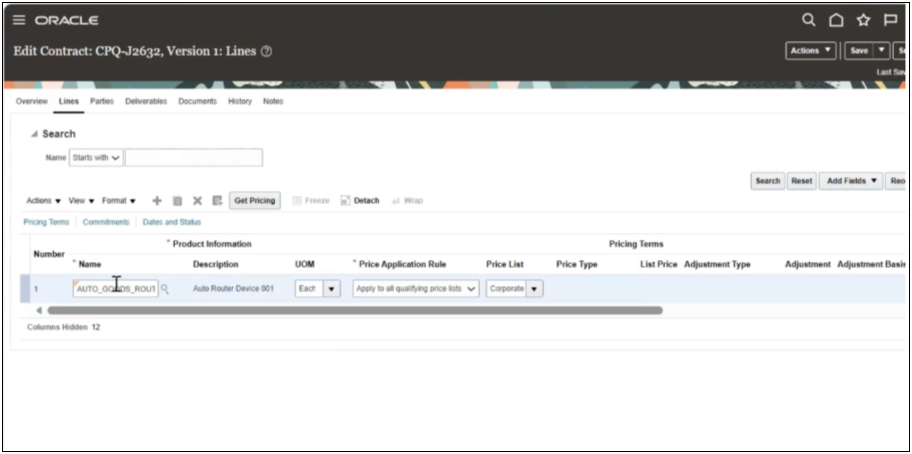
The following shows Fusion Sales Contract lines and pricing terms created from the CPQ agreement flow.
NOTES
Notes:
-
Oracle CPQ is implemented for quote creation and agreement negotiation.
-
Fusion Sales Contracts is implemented for Sales Agreement Contracts.
-
Fusion Pricing is available for downstream pricing execution.
-
Header Sales Agreement selection is used to default line-level agreement information. It doesn’t introduce separate header-level pricing behavior.
-
If no Sales Agreement applies to a quote line, Oracle CPQ continues through the existing Fusion Pricing flow without Sales Agreement-specific pricing.
-
If agreement values are cleared or don’t apply, Oracle CPQ doesn’t send old sales agreement data during repricing.
-
Keep pricing behavior consistent when quote lines are added, updated, repriced, saved, refreshed, or reopened.
-
Select or override an Applied Sales Agreement line at the quote line level when multiple eligible agreements exist.
-
Make discount type and discount value read-only when Fusion Pricing returns a non-negotiable charge.
 See Also


