Commerce Access Rules
Overview
Oracle CPQ 24B expands the functionality of Commerce Hiding Rules to allow administrators to dynamically control read/write permissions for Commerce attributes. This greatly reduces the amount of effort to control access for Commerce attributes. Previously, Hiding Rules allowed administrator to hide actions and attributes when a pre-defined condition is met. Administrators can now additionally select a specific Step and/or Participant Profile for the attribute’s visibility and edibility behavior when a pre-defined condition is met. Administrators can also specify access behavior in BML functions for Advanced action types. These rules are triggered based off an attribute change (AJAX).
For example, If the Line Item Grid contains a line with Part Number 'S2000', then hide that line's Net Ea input attribute and Net Ea Override Attribute.
Similar to Hiding Rules in Configuration, Access Rules in Commerce can hide actions or attributes from buyers and dynamically control attribute edibility when certain conditions are met. Commerce Access Rules are run using AJAX, meaning that an action doesn’t need to be performed in order for them to run. An Access Rule has a condition and an action. When the condition is met, the rule will hide the action components. Access rules can be written and/or run on actions or attributes in the main document or sub-document. Different from constraints, access rules written on the sub-document level can only hide sub-document components.
 Access Rules on Sub-Document Level
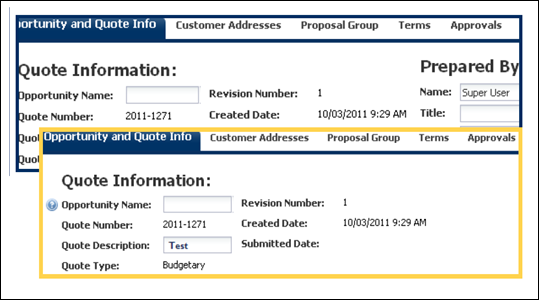
The image below shows an access rule on the sub-document would look for the user. In this case, a rule was written so that when the part number was S2000, the Net Each Write-In and Net Ea Override attributes where affected. Since the entire column should not be removed, as this rule evaluates all lines and applies it only when the condition is met, the application will remove/hide the input fields for the affected attributes.

You can control whether or not a dialog loading box appears for the constraint and access rules by making a settings change within Commerce Settings. For the option ‘Number of Milliseconds to Wait Before Showing the Loading Dialog for AJAX Rules’, enter:
- Positive number: Determines how many milliseconds the dialog will appear.
- Negative number: Disables the processing dialog for AJAX rules.
-
Zero (0): This will happen instantaneously.
In order to remove an entire column from the line item grid, you'll have to write an access rule on the main document level that affects a sub-document attribute.
Hiding Components using Transaction Arrays
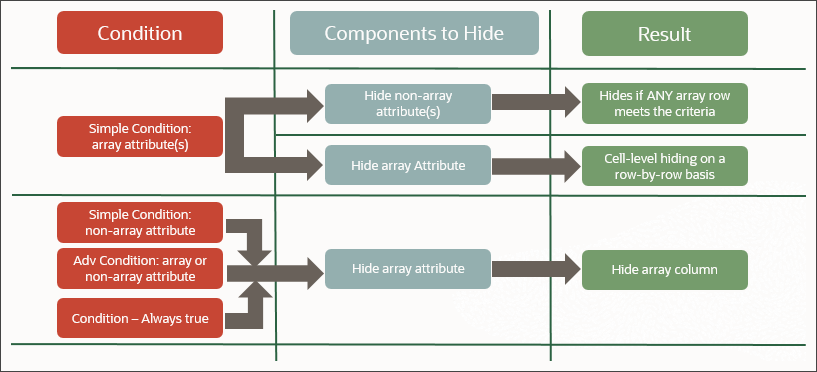
Administrators can use transaction array set attributes in the Commerce Access Rules. Array attributes can be used in both simple and advanced modes for the Condition and for the Components to Hide/Read-only sections of the access rules. Transaction array hiding behaviors are similar to Configuration array set behaviors.
Transaction array attribute hiding behaviors are as follows:
- If an array attribute is used as a simple condition and the components to hide only uses document attributes, the result is that the document attributes are hidden if any array row meets the condition.
- If an array attribute is used as a simple condition and the components to hide also use array attributes, the result is cell-level hiding as determined on a row-by-row basis.
- If a simple condition exists without referencing an array attribute and the components to hide uses array attributes, the result is that the entire array column is hidden.
- If an advanced condition is used either with or without array attributes and the components to hide uses array attributes, the result is that the entire array column is hidden.
- If a condition is "Always True" and the components to hide uses array attributes, the result is that the entire array column is hidden.
Access Rules on Actions
Administrators can use access rules to hide Commerce actions on the Desktop or Mobile UI when certain conditions are satisfied.
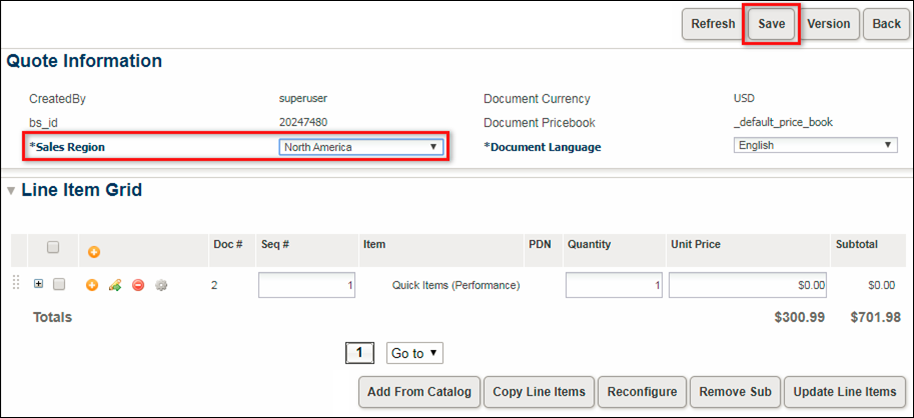
For example: an administrator can build a access rule to hide the Save button unless the Sales Region is specified. This would prevent a sales user from saving Transactions without Sales Region information.
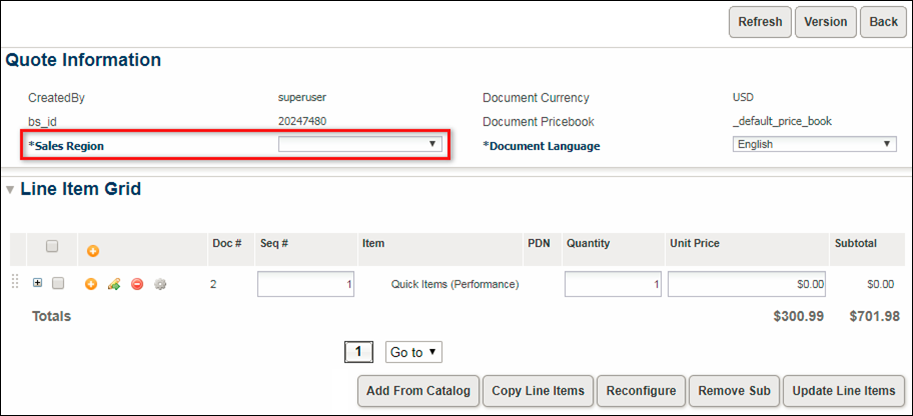
In the following image, the Sales Region has been provided and the Save button is displayed. Since the sales user has provided Sales Region information, they will be allowed to save the Transaction.
Administration
Create an Access Rule
Perform the following steps to create an access rule for a Commerce action or attribute.
-
Navigate to the Rule Editor page.
Admin > Commerce and Documents > Process Definition > Documents > Rules
-
Select Access from the Add drop-down menu.
-
Enter the rule Properties.
-
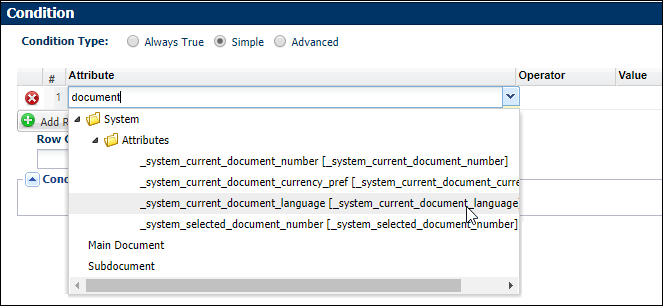
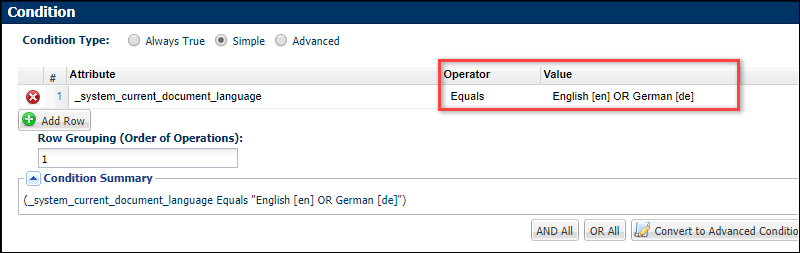
Define rule Condition.
Select the Condition Type
Always True - The rule will fire automatically, every time, because a specific condition does not need to be met.

Simple - Use the rule editor to define condition attribute values.
Advanced - Define advanced conditions using BML.
- Select the Action Type.
-
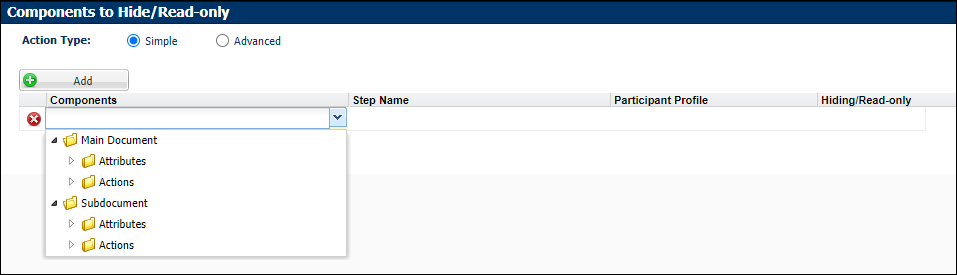
Select the applicable action or attribute from the Components drop-down.
- For main document access rules, you can add main and sub-document attributes and actions.
- For sub-document access rules, you can only add sub-document attributes and actions.
-
If applicable, select the workflow Step Name.
-
If applicable, select the workflow Participant Profile.
-
Select the Hiding/Read-only option.
- Click Add and repeat Step 6 - Step 9 to add additional components.
- Click Save.
AJAX Notes:
- Access rules are performed with AJAX functionality, while validation rules are tied to actions, meaning a user must click an action button for validation rules to run.
- Because of AJAX functionality, an action doesn't need to be performed in order for access rules to run. In addition, the rule will run without refreshing the page.
Transaction Array Notes:
- If Access Rules are used to hide a transaction array, administrators should designate an Array Controller Attribute for the transaction array and set the minimum value to one or more.
- Different transaction array sets cannot be referred to in that same condition or component to hide.
- In advanced BML, only the transaction array set is available for selection.
- Administrators can still access the transaction array attribute from BML functions.
- When a transaction array attribute is used in a simple condition, the array attribute will trigger auto update.
- When array attributes are used in the Advanced BML condition part of an access rule, individual attributes would need to be explicitly marked as auto-update enabled.
- Access rules containing the array attributes/sets references can be migrated granularly.
Notes
- NULL and blank Integer values are treated as separate values:
- Using NULL as an attribute value is strongly discouraged.
- If you use logic that tests for NULL values in rule conditions or BML, confirm that the logic takes this difference into account.
Custom Variable Name Conventions Oracle CPQ appends the "_c" suffix to custom variable names to provide more consistency for integrations with Oracle Sales.
Customers can submit a Service Request (SR) on My Oracle Support to disable the "_c" suffix on variable names for custom Commerce entities
- When the "_c" is disabled, the "_c" variable name suffix will not be required for newly created custom Commerce entities.
- Disabling the "_c" variable name suffix for custom Commerce entities will not change existing variable names.
- The "_c" suffix setting will not impact existing variable names when cloning a Commerce process or migrating Commerce items. Target variable names will be the same as the variable names from the source Commerce process.
Notes:
- Oracle CPQ Standard Process provide a converged set of generic rules sourced from existing Oracle CPQ reference applications. The Standard Process rules cannot be deleted or modified, but they can be inactivated. For Validation type rules Linked Actions can be updated. Refer to Standard Process Rules to rules that are provided in the Standard Process.
- Test performance early and often – AJAX enabled constraint and access rules might make the Transaction page slow depending on the number of attributes, rules, use of advanced function, and so on. Performance tests are a must!
Related Topics
See Also